 Is there a way to localize (translate) text messages similar to the ACUCOBOL-GT TEXT configuration variable?
 |
|
The isCOBOL text messages displayed by the compiler, debugger and runtime can be customized or translated into the language of your choice.
iscobol.jar file contains text resource files for the following locales:
ar, de, el, en, es, fr, it, ja, nl, pt, ru, zh_CN, zh_TW
The above are ISO 639-1 codes listed on http://www.loc.gov/standards/iso639-2/php/code_list.php optionally followed by an underscore and an ISO 3166-1 country code listed at http://www.iso.org/iso/country_codes/iso_3166_code_lists/english_country_names_and_code_elements.htm
You'll find a properties file for each of the above locales named "IscobolMessage_xx.properties", with the locale name replacing the xx, in the "iscobol.jar" library.
You can look at these files with an archive tool such as WinRAR or 7zip.
The following screenshot shows the locale files included in iscobol.jar
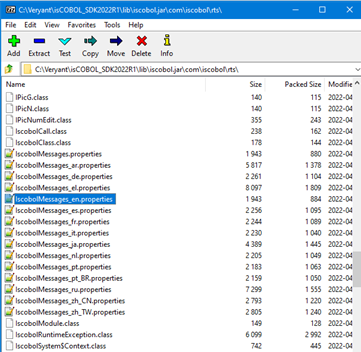
These messages can be customized with the following steps:
- Open a command prompt and move to the %ISCOBOL%/lib directory.
- Extract the default language text resource file or the file you are customizing with the following command:
jar xvf iscobol.jar com/iscobol/rts/IscobolMessages_xx.properties
where xx is one of the codes listed above. For example, to extract the default message file
jar xvf iscobol.jar com/iscobol/rts/IscobolMessages.properties
To customize the English language message file
jar xvf iscobol.jar com/iscobol/rts/IscobolMessages_en.properties
- Each line consists of a key and a message. Edit the messages as needed. You can modify the message, but don't change the key.
If you are adding a new language, then rename the file to IscobolMessages_xx.properties replacing xx with the appropriate code(s) from the websites listed above, and modify the messages with the correct value for that language.
- Add the text resource file to a new jar file with the following command:
jar cvf mymessages.jar com/iscobol/rts/IscobolMessages_xx.properties
replacing xx with the appropriate code and "mymessages.jar" with your preferred name.
- Make sure your new jar file precedes iscobol.jar in the class path used when running a program. The easiest way to do this is to put your jar file in the special folder %ISCOBOL%jars.
The runtime framework will read this folder before it reads the lib folder
If you prefer, you can replace the text resource file in iscobol.jar with the jar -u option. For example, to replace the English messages in iscobol.jar use the following command:
jar uvf iscobol.jar com/iscobol/rts/IscobolMessages_en.properties


Note:
that text resource files must be written using ISO 8859-1 encoding.
To insert characters that cannot be represented by the ISO encoding, Unicode escape sequences must be used. The escape sequence is written as a \u followed by the utf-16 representation of the character (the same you would use with NX syntax in the COBOL source).
|
| Authored
by: Veryant Support
This question has been viewed 7849 times so far.
|
| Click
Here to View all the questions in Localization
category. |
 File Attachments
 |
| There are no attachment file(s) related to this question. |
| |
 User Comments User Comments |
 |
|
| There are no user comments for this question. Be the first to post a comment. Click Here |
 Related Questions Related Questions
|
- How do I use text that has been translated into other languages in my screens and messages?
|


 Contact



 Search Knowledge Base
